



athenaOne Integration
Connect Dialpad with athenaOne to surface patient records in real time, open the right chart, and log calls automatically, helping healthcare teams reduce manual work, improve context, and deliver faster, more informed patient interactions.
Media
Overview
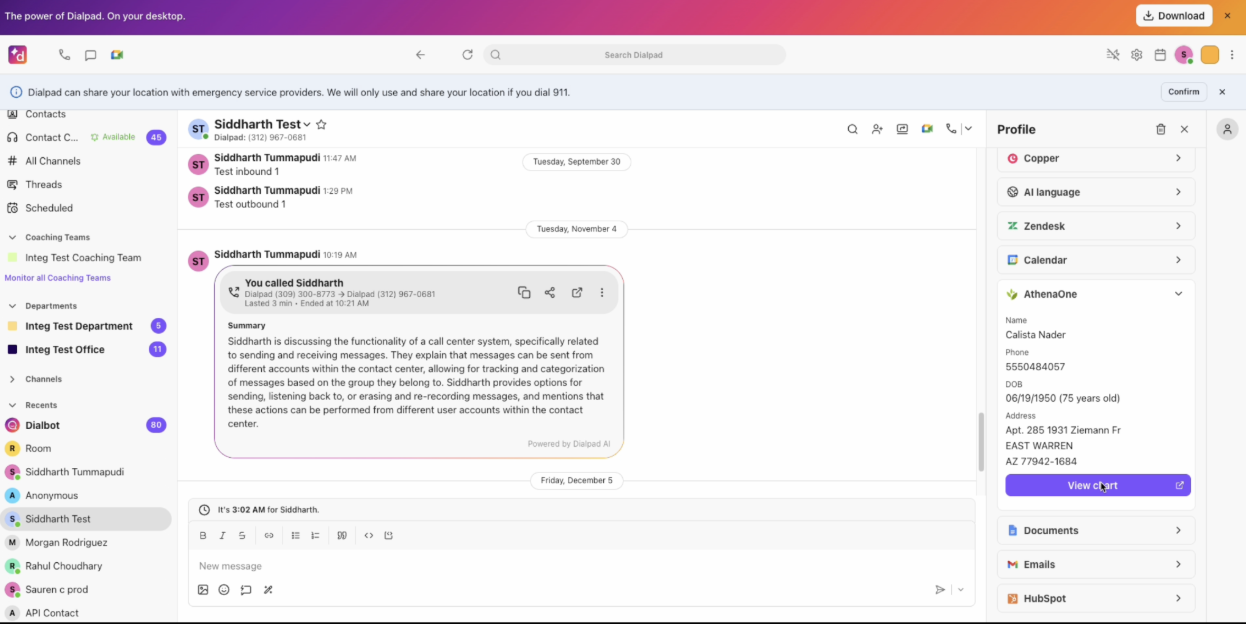
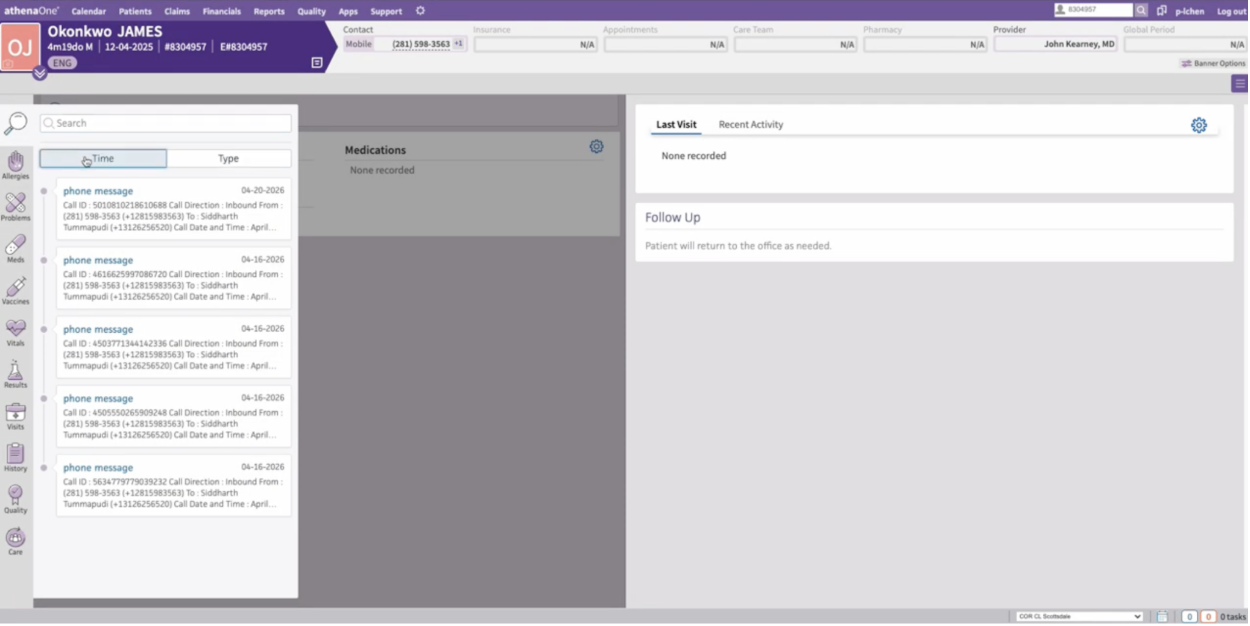
The Dialpad + athenaOne integration connects your contact center to athenaOne so healthcare teams can handle patient calls with more context and less manual work. When a call comes in, Dialpad matches the caller to the right patient record and shows key details like name, phone, DOB, age, and address in a dedicated sidebar. Agents can then jump directly into the patient chart in athenaOne for deeper context. After the call, Dialpad logs the interaction as an encounter with key details like call direction, time, duration, agent, and an optional call summary link. The result is faster patient support, fewer manual lookups, and a more seamless experience across communications and care workflows.
Key Features
Automatic patient matching: Match inbound calls to the right athenaOne patient record using phone number, with support for manual rematch when needed.
Dedicated healthcare sidebar: View key patient details in Dialpad, including name, phone, DOB, age, and address, without leaving the call workspace.
One-click chart access: Jump directly from Dialpad to the patient’s athenaOne chart for deeper context and follow-up actions.
Call logging to encounters: Automatically log calls in athenaOne with direction, time, duration, agent, and an optional call summary link.
Manual patient search: Search by full name, DOB, email, phone, last 4 SSN, or patient ID when auto-match isn’t enough.
Built for healthcare workflows: Designed for high-volume patient management and contact center teams that need faster handling with less manual work.
athenaOne Integration
Connect Dialpad with athenaOne to surface patient records in real time, open the right chart, and log calls automatically, helping healthcare teams reduce manual work, improve context, and deliver faster, more informed patient interactions.
Media
Overview
The Dialpad + athenaOne integration connects your contact center to athenaOne so healthcare teams can handle patient calls with more context and less manual work. When a call comes in, Dialpad matches the caller to the right patient record and shows key details like name, phone, DOB, age, and address in a dedicated sidebar. Agents can then jump directly into the patient chart in athenaOne for deeper context. After the call, Dialpad logs the interaction as an encounter with key details like call direction, time, duration, agent, and an optional call summary link. The result is faster patient support, fewer manual lookups, and a more seamless experience across communications and care workflows.
Key Features
Automatic patient matching: Match inbound calls to the right athenaOne patient record using phone number, with support for manual rematch when needed.
Dedicated healthcare sidebar: View key patient details in Dialpad, including name, phone, DOB, age, and address, without leaving the call workspace.
One-click chart access: Jump directly from Dialpad to the patient’s athenaOne chart for deeper context and follow-up actions.
Call logging to encounters: Automatically log calls in athenaOne with direction, time, duration, agent, and an optional call summary link.
Manual patient search: Search by full name, DOB, email, phone, last 4 SSN, or patient ID when auto-match isn’t enough.
Built for healthcare workflows: Designed for high-volume patient management and contact center teams that need faster handling with less manual work.