



Slate CRM Integration
Connect Dialpad with Slate CRM to automatically match callers to student records, pop the right contact on screen, and log every call with AI-generated recaps so enrollment teams have full context and clean data without manual entry.
Media
Overview
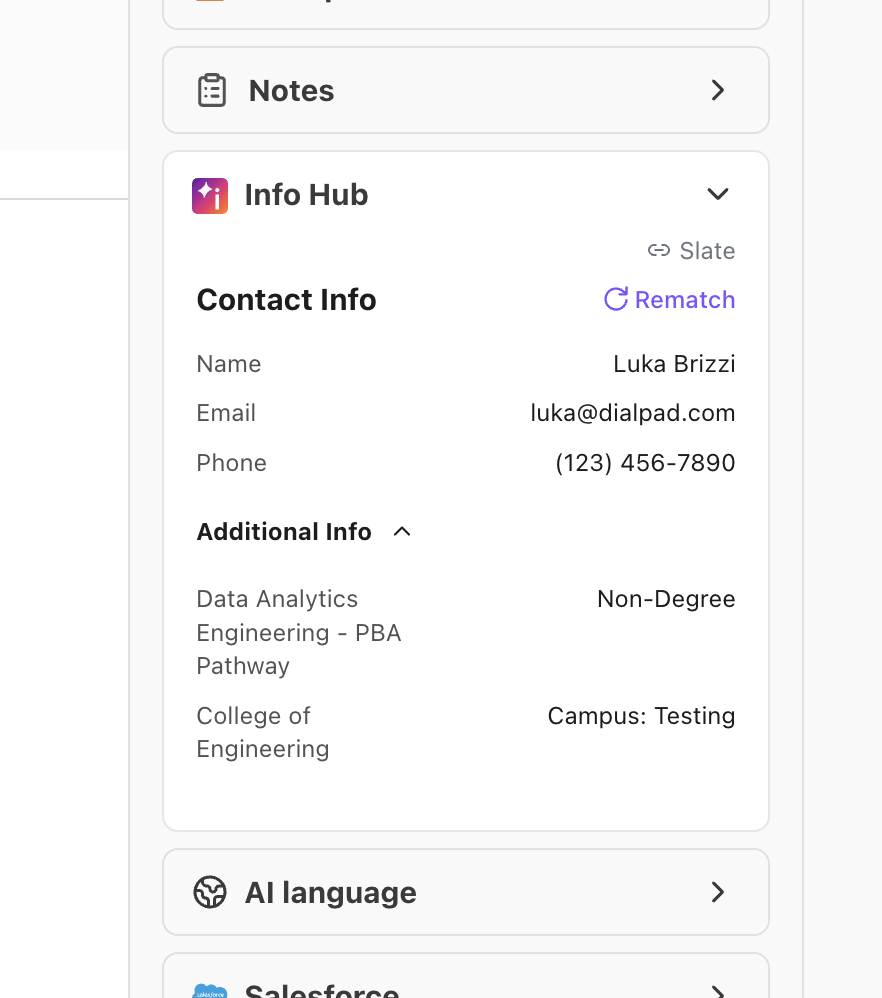
The Dialpad + Slate integration connects your phone system to Slate so enrollment teams get real-time student context and automatic call logging without tab switching. When calls come in or go out, Dialpad matches the caller to Slate contact records by phone, name, or email and can pop the right record on screen. In Dialpad, a sidebar shows key student details and intended program enrollment (IPE) fields so advisors see program, degree, college, and campus while they talk. After the call ends, Dialpad logs direction, duration, timing breakdowns, agent info, disposition, and AI-generated recaps directly on the Slate contact record—reducing manual data entry and keeping interaction histories complete and accurate.
Key Features
Automatic student matching: Match callers to Slate contact records by phone number, name, or email so staff see the right student from the start.
Screen pop to Slate: Open the matched Slate contact record automatically on inbound and/or outbound calls.
In-call student sidebar: View key contact details and intended program enrollment (program, degree, college, campus) directly in Dialpad.
Rich call logging to Slate: Log call direction, duration, timing breakdowns, agent, disposition, and AI-generated recap on the Slate contact record.
Manual search and rematch: Search for contacts by name, email, or phone from the sidebar when multiple or no matches are found, ensuring accurate logging.
Slate CRM Integration
Connect Dialpad with Slate CRM to automatically match callers to student records, pop the right contact on screen, and log every call with AI-generated recaps so enrollment teams have full context and clean data without manual entry.
Media
Overview
The Dialpad + Slate integration connects your phone system to Slate so enrollment teams get real-time student context and automatic call logging without tab switching. When calls come in or go out, Dialpad matches the caller to Slate contact records by phone, name, or email and can pop the right record on screen. In Dialpad, a sidebar shows key student details and intended program enrollment (IPE) fields so advisors see program, degree, college, and campus while they talk. After the call ends, Dialpad logs direction, duration, timing breakdowns, agent info, disposition, and AI-generated recaps directly on the Slate contact record—reducing manual data entry and keeping interaction histories complete and accurate.
Key Features
Automatic student matching: Match callers to Slate contact records by phone number, name, or email so staff see the right student from the start.
Screen pop to Slate: Open the matched Slate contact record automatically on inbound and/or outbound calls.
In-call student sidebar: View key contact details and intended program enrollment (program, degree, college, campus) directly in Dialpad.
Rich call logging to Slate: Log call direction, duration, timing breakdowns, agent, disposition, and AI-generated recap on the Slate contact record.
Manual search and rematch: Search for contacts by name, email, or phone from the sidebar when multiple or no matches are found, ensuring accurate logging.